Your whole team on one WhatsApp number
Messages from WhatsApp and your other channels land in one queue. Each conversation shows who’s handling it, so two people don’t answer the same customer.
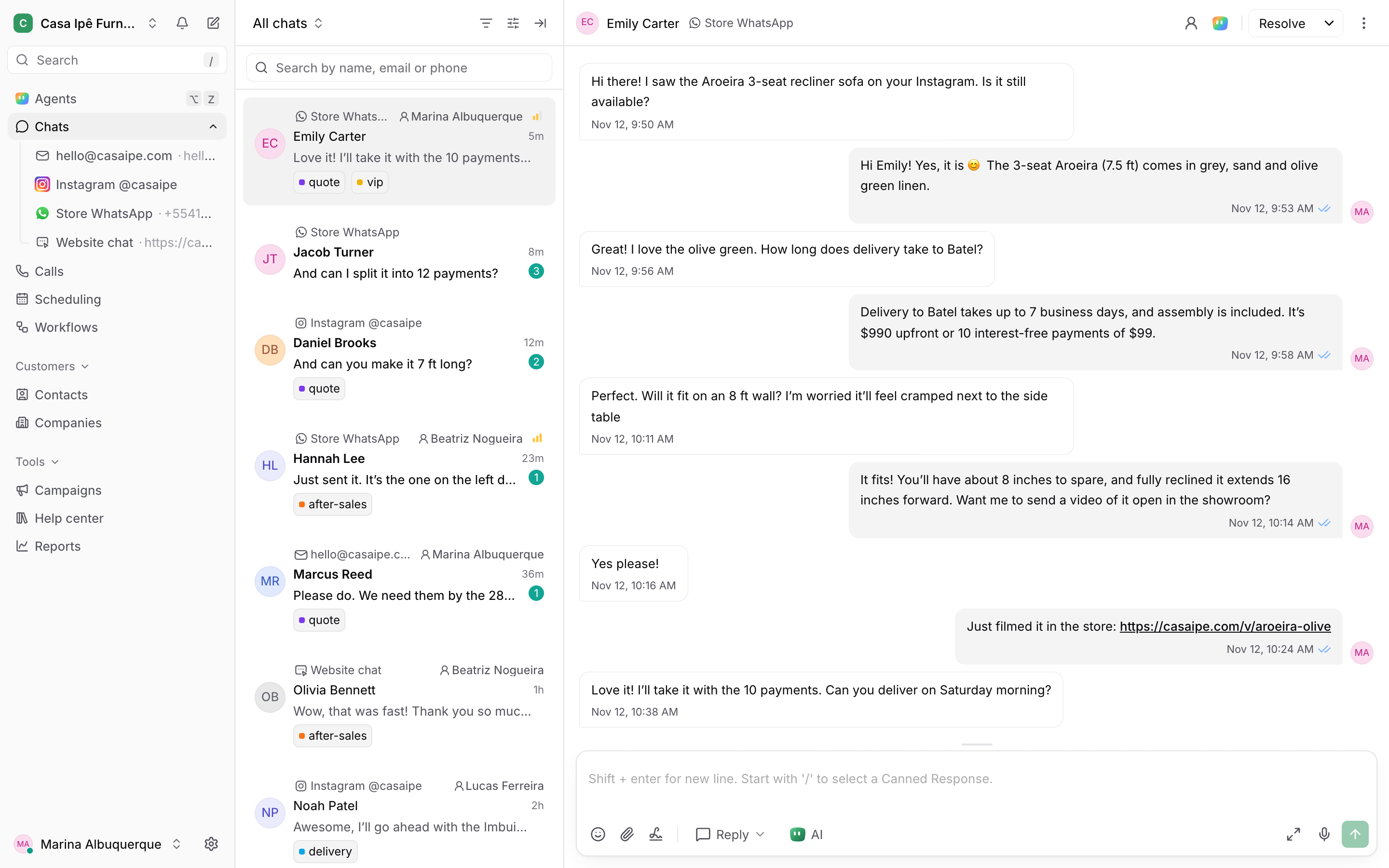
-
One queue
WhatsApp, Instagram, Messenger, email, website chat and more in one place.
-
Clear ownership
Every conversation has a person or team looking after it.
-
Talk internally
Private notes and mentions without leaving the conversation.
Each team member sees what they need to answer
Mine shows what’s assigned to you, and Unassigned shows what nobody has picked up yet. If your team keeps using the same filter, save it as a view.
- Mine, Unassigned and All
- Saved views
- Open, pending, snoozed or resolved
- Priority for what’s urgent
Assign conversations to a person or team
Pick who handles each conversation, or let Zailor share them across the team. Because every conversation has an owner, it’s clear who should reply.
- Manual or automatic assignment
- By person or by team, with a cap per person
- One inbox per channel, with its own settings
Ask a team member for help in the conversation
Private notes sit inside the conversation and only your team can see them. To get a second opinion, mention a team member in a note.
- Private notes visible only to your team
- Mentions to bring a team member in
- Labels to organize by topic
Every conversation has an owner
Your team can see who is looking after every conversation.
- Work queues Mine, Unassigned and All, with saved views.
- Assignment Manual or automatic, by team or by person.
- Private notes They sit in the conversation and only your team sees them.
- Mentions Bring a team member in to help.
- Labels Organize and find conversations by topic.
- Priority and status Open, pending, snoozed or resolved.
- Search Across conversations, messages and contacts.
- Keyboard shortcuts A command menu to act without the mouse.
- AI in the conversation Reply suggestions, tone changes and conversation summaries.
-
Which channels arrive in the shared inbox?
WhatsApp, Instagram Direct, Facebook Messenger, email, website chat, Telegram, LINE, TikTok and SMS. You can also bring in messages from other systems through an API channel.
-
How do I stop two people from answering the same customer?
Each conversation can have an owner, assigned by hand or automatically. Your team can see who is looking after every conversation.
-
Can I split conversations by department or team?
Yes. Each channel becomes an inbox, and you choose which team members can access each one. On Business and above, you can also create teams and assign conversations to a team.
-
Can I keep using the same number in the WhatsApp Business app?
Yes. With coexistence, the app stays on your phone and the same number works in Zailor. New one-to-one conversations arrive in Zailor; group chats aren’t synced.
-
How many team members can use the same number?
Zailor has no cap on team members. You pay per team member per month, and WhatsApp is included from the Pro plan.
-
What’s the difference between the app and the official API?
With the app, the number lives on a phone and a few linked devices, with no conversation assignment. With the official API, Zailor shares the number’s conversations across your team, with owners, private notes and each customer’s history.
Keep exploring
See an agent answer your WhatsApp
Book a demo and our team will show you Zailor working with your channels.
Already have an account? Log in